반응형
현재 내 서버에 10.34.1.151, 152, 153 3개 노드에 k3s 를 설치해 두었다.
10.34.1.150 에 vip 를 설정하고 metallb 도 해둔 상태인데
이전에 실습하면 consul 서비스를 사용하려면 3개 노드가 필요하다고 하여.. k3s 에 가상화를 적용하지 않고 직접 설치를 했었다.
그래서 기존에 존재하는 k3s 에 설치하는 방법을 찾아보았고 잘 되는 것 같아 기록을 남긴다.
일단 k3s 기본으로 같이 설치된 traefik 설정을 변경한다.
sudo kubectl edit svc traefik -n kube-system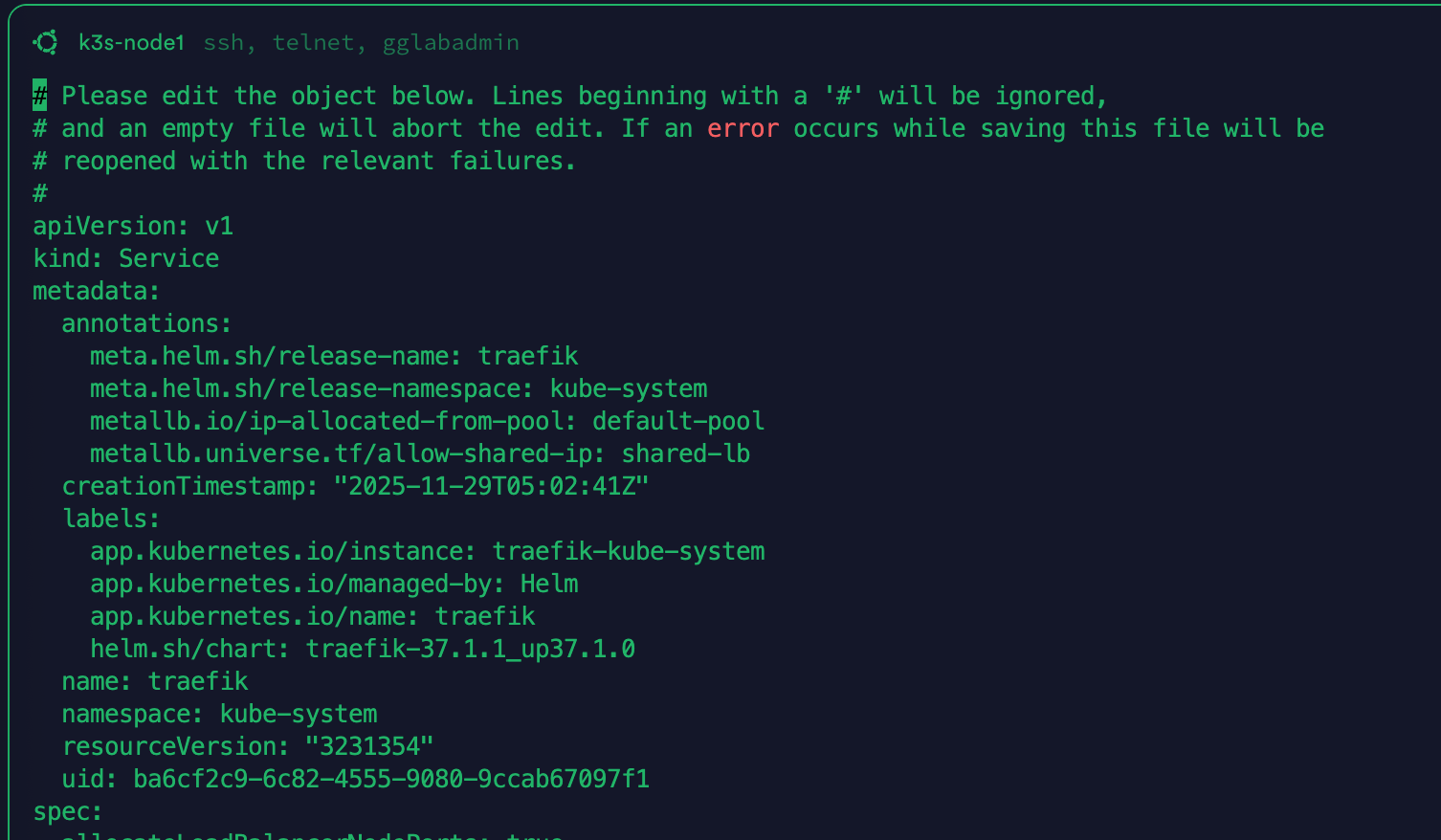
metadata:
  annotations:
    meta.helm.sh/release-name: traefik
    meta.helm.sh/release-namespace: kube-system
    metallb.io/ip-allocated-from-pool: default-pool
    metallb.universe.tf/allow-shared-ip: shared-lb # 요부분
기존에 80, 443 을 traefik 이 사용중인데 같은 아이피의 다른 포트를 사용하기 위해서 추가해야한다고 한다.
그리고 나머지는
gglabadmin@k3s-node1:/k8s/apps/consul$ cat consul-statefulset.yaml
# Headless Service for Consul cluster communication
apiVersion: v1
kind: Service
metadata:
  name: consul
  labels:
    app: consul
spec:
  clusterIP: None
  ports:
    - name: http
      port: 8500
      targetPort: 8500
    - name: dns
      port: 8600
      targetPort: 8600
    - name: server
      port: 8300
      targetPort: 8300
    - name: serf-lan
      port: 8301
      targetPort: 8301
    - name: serf-wan
      port: 8302
      targetPort: 8302
  selector:
    app: consul

---
# UI Service for external access
apiVersion: v1
kind: Service
metadata:
  name: consul-ui
  labels:
    app: consul
spec:
  type: NodePort
  ports:
    - name: http
      port: 8500
      targetPort: 8500
      nodePort: 30850
  selector:
    app: consul

---
# StatefulSet for Consul servers
apiVersion: apps/v1
kind: StatefulSet
metadata:
  name: consul
spec:
  serviceName: consul
  replicas: 3
  selector:
    matchLabels:
      app: consul
  template:
    metadata:
      labels:
        app: consul
    spec:
      containers:
      - name: consul
        image: hashicorp/consul:1.17.0
        args:
          - "agent"
          - "-server"
          - "-bootstrap-expect=3"
          - "-ui"
          - "-data-dir=/consul/data"
          - "-bind=0.0.0.0"
          - "-client=0.0.0.0"
          - "-retry-join=consul-0.consul.default.svc.cluster.local"
          - "-retry-join=consul-1.consul.default.svc.cluster.local"
          - "-retry-join=consul-2.consul.default.svc.cluster.local"
          - "-domain=cluster.local"
          - "-datacenter=dc1"
        ports:
          - containerPort: 8500
            name: ui-port
          - containerPort: 8400
            name: alt-port
          - containerPort: 53
            name: udp-port
          - containerPort: 8443
            name: https-port
          - containerPort: 8080
            name: http-port
          - containerPort: 8301
            name: serflan
          - containerPort: 8302
            name: serfwan
          - containerPort: 8600
            name: consuldns
          - containerPort: 8300
            name: server
        env:
          - name: POD_IP
            valueFrom:
              fieldRef:
                fieldPath: status.podIP
          - name: NAMESPACE
            valueFrom:
              fieldRef:
                fieldPath: metadata.namespace
        volumeMounts:
          - name: consul-data
            mountPath: /consul/data
        livenessProbe:
          httpGet:
            path: /v1/status/leader
            port: 8500
          initialDelaySeconds: 30
          periodSeconds: 10
        readinessProbe:
          httpGet:
            path: /v1/status/peers
            port: 8500
          initialDelaySeconds: 10
          periodSeconds: 5
  volumeClaimTemplates:
  - metadata:
      name: consul-data
    spec:
      accessModes: [ "ReadWriteOnce" ]
      resources:
        requests:
          storage: 1Gi
---
apiVersion: v1
kind: Service
metadata:
  name: consul-lb
  labels:
    app: consul
  annotations:
    metallb.universe.tf/allow-shared-ip: "shared-lb"
spec:
  type: LoadBalancer
  loadBalancerIP: 10.34.1.150
  ports:
    - name: http
      port: 8500
      targetPort: 8500
      protocol: TCP
    - name: dns-tcp
      port: 8600
      targetPort: 8600
      protocol: TCP
    - name: dns-udp
      port: 8600
      targetPort: 8600
      protocol: UDP
  selector:
    app: consul
나머지는 이렇게 했더니 잘 동작했다.
gpt 설명을 남기고 마무리 한다.
1. consul (Headless Service)
yaml
apiVersion: v1
kind: Service
metadata:
  name: consul
spec:
  clusterIP: None  # Headless Service
역할
- Consul 클러스터 내부 통신 전용
- clusterIP: None으로 설정되어 있어서 로드밸런싱 없이 각 Pod에 직접 연결
- StatefulSet의 각 Pod에 고유한 DNS 이름 제공
DNS 이름
- consul-0.consul.default.svc.cluster.local
- consul-1.consul.default.svc.cluster.local
- consul-2.consul.default.svc.cluster.local
포트 역할
- 8500 (http): Consul HTTP API
- 8600 (dns): Consul DNS 서버
- 8300 (server): Consul 서버 간 RPC 통신
- 8301 (serf-lan): 로컬 네트워크 가십 프로토콜 (노드 발견, 헬스체크)
- 8302 (serf-wan): WAN 가십 프로토콜 (다른 데이터센터 통신)
사용 예시
StatefulSet args에서 사용:
yaml
- "-retry-join=consul-0.consul.default.svc.cluster.local"요약: Consul 서버들끼리 서로 찾고 통신하기 위한 내부 서비스
2. consul-ui (NodePort Service)
yaml
apiVersion: v1
kind: Service
metadata:
  name: consul-ui
spec:
  type: NodePort
  nodePort: 30850
역할
- Consul UI에 직접 접근하기 위한 서비스
- 클러스터의 모든 노드 IP에서 접근 가능
접근 방법
bash
# 어떤 노드 IP로도 접근 가능
http://<node1-ip>:30850
http://<node2-ip>:30850
http://<node3-ip>:30850
포트
- 8500 → Consul HTTP API/UI
장점
- LoadBalancer 없이도 외부 접근 가능
- 간단한 테스트/디버깅용으로 유용
단점
- 포트 번호(30850)를 기억해야 함
- 프로덕션에서는 잘 사용 안 함
요약: 노드 IP + 고정 포트로 Consul UI에 접근하는 간단한 방법
3. consul-lb (LoadBalancer Service)
yaml
apiVersion: v1
kind: Service
metadata:
  name: consul-lb
  annotations:
    metallb.universe.tf/allow-shared-ip: "shared-lb"
spec:
  type: LoadBalancer
  loadBalancerIP: 10.34.1.150
역할
- 프로덕션 환경에서 Consul에 접근하기 위한 서비스
- **고정 IP (VIP)**를 통해 접근
- MetalLB를 통해 traefik과 같은 IP 공유
접근 방법
bash
# 고정 IP로 접근
http://10.34.1.150:8500  # Consul UI/API
dig @10.34.1.150 -p 8600 # Consul DNS
```

### 포트
- **8500** (TCP): Consul HTTP API/UI
- **8600** (TCP): Consul DNS over TCP
- **8600** (UDP): Consul DNS over UDP

### IP 공유
```
10.34.1.150:80   → traefik (HTTP)
10.34.1.150:443  → traefik (HTTPS)
10.34.1.150:8500 → consul-lb (Consul UI/API)
10.34.1.150:8600 → consul-lb (Consul DNS)
장점
- 기억하기 쉬운 고정 IP
- 표준 포트 사용 (80, 443, 8500)
- 프로덕션 레벨
요약: 프로덕션에서 사용하는 메인 접근 방법 (고정 IP + 표준 포트)
전체 구조 비교
서비스타입용도접근 방법사용 목적
| consul | Headless | 내부 통신 | consul-0.consul.default.svc.cluster.local | Consul 클러스터 구성 |
| consul-ui | NodePort | 개발/테스트 | <node-ip>:30850 | 간단한 외부 접근 |
| consul-lb | LoadBalancer | 프로덕션 | 10.34.1.150:8500 | 실제 서비스 제공 |
실제 사용 시나리오
시나리오 1: Consul 클러스터 부팅
yaml
# consul (Headless) 사용
- "-retry-join=consul-0.consul.default.svc.cluster.local"
→ 각 서버가 서로를 찾아서 클러스터 형성
시나리오 2: 개발자가 빠르게 UI 확인
bash
# consul-ui (NodePort) 사용
curl http://192.168.1.100:30850/ui/
→ 노드 IP만 알면 바로 접근
시나리오 3: 애플리케이션에서 Consul 사용
bash
# consul-lb (LoadBalancer) 사용
export CONSUL_HTTP_ADDR="http://10.34.1.150:8500"
consul members
→ 고정 IP로 안정적으로 접근
시나리오 4: 다른 Pod에서 Service Discovery
yaml
# consul (Headless) 사용
env:
  - name: CONSUL_HTTP_ADDR
    value: "http://consul:8500"
→ 클러스터 내부에서는 서비스 이름으로 접근
정리: 각 서비스를 언제 사용할까?
- consul (Headless): Consul 서버들끼리 통신, StatefulSet Pod들의 고유 DNS
- consul-ui (NodePort): 빠른 테스트, 디버깅, 개발 환경
- consul-lb (LoadBalancer): 실제 서비스 제공, 프로덕션 환경, 외부 접근
반응형
'인프라 > Kubernetes' 카테고리의 다른 글
| k3s Cert-Manager 에서 외부 서비스로 Proxy (0) | 2025.11.30 |
|---|---|
| k3s 에서 dnszi 유동아이피 연동 스케쥴 추가하기 (0) | 2025.11.30 |
| pfSense 와 CertManager 연동 오류 (0) | 2025.11.29 |
| (실전) k8s 설치부터 https 서비스 포팅까지 (0) | 2025.11.23 |
| (연습) k3s HA 구성 트래픽 흐름 구조 (0) | 2025.11.21 |